Are you tired of manually turning your pool pump on and off? You’re not alone. Many pool owners find it a hassle to keep track of pump schedules, especially during the busy summer months. A timer can be the perfect solution to simplify your routine and ensure your pool stays clean and well-maintained.
Key Takeaways
- Automation Enhances Convenience: Installing a timer on your pool pump streamlines maintenance, eliminating the need for manual operation while ensuring consistent water circulation.
- Types of Timers: Choose from mechanical, digital, or smart timers based on your needs, with options ranging from simple dial settings to advanced mobile connectivity.
- Increased Energy Efficiency: Timers optimize pump run times, leading to reduced energy consumption and lower utility bills, making them a cost-effective choice for pool maintenance.
- Maintenance of Water Quality: Regular and automated circulation aids in preventing algae growth and maintaining clear water, crucial for a healthy swimming environment.
- Installation Considerations: Ensure compatibility with your pump, select a weatherproof location for mounting, and follow specific wiring instructions for a successful installation.
- Troubleshooting Tips: Common issues include checking power supply, inspecting connections, and verifying timer settings to maintain optimal functionality.
Overview of Pool Pump Timers
Pool pump timers automate the operation of your pump, enhancing convenience and efficiency. They eliminate the hassle of manually turning the pump on and off, especially during peak swimming seasons. When installed correctly, timers help maintain clean water by ensuring consistent circulation.
Types of Pool Pump Timers
- Mechanical Timers: These are simple dial-based timers. You set the dial to the desired run time. They’re typically cheaper but can be less precise.
- Digital Timers: Digital models offer programmable settings for specific days and times. You can set multiple on/off cycles, providing more control over your pool pump.
- Smart Timers: These advanced timers connect to your smartphone or Wi-Fi. You can monitor and adjust settings remotely, offering ultimate convenience.
Benefits of Using a Timer
- Energy Savings: Timers help optimize pump run times, reducing energy consumption and lowering utility bills.
- Water Quality Maintenance: Consistent circulation helps prevent algae growth and keeps your water clear.
- Convenience: Set it and forget it. Timers handle the timing for you, allowing you to enjoy your pool without frequent manual adjustments.
Choosing the Right Timer
When selecting a timer, consider the following factors:
- Pump Compatibility: Ensure the timer is compatible with your pool pump’s voltage and amperage.
- Ease of Use: Opt for a timer that is user-friendly and easy to program.
- Weatherproofing: Choose a timer designed for outdoor use to withstand moisture and UV exposure.
- Mounting Location: Choose a location close to your pump and power source, preferably protected from weather elements.
- Wiring: Follow the manufacturer’s wiring instructions carefully. If unsure, consulting a professional is advisable.
- Test the Timer: After installation, run the pump through a complete cycle to ensure the timer functions correctly.
Using a timer for your pool pump significantly enhances your pool maintenance routine. With various options available, you can easily find a timer that fits your needs and preferences, making swimming enjoyable with less effort.
Tools and Materials Needed
For successful installation of a timer on your pool pump, gather the following tools and materials. This preparation ensures a smooth process.
Recommended Products
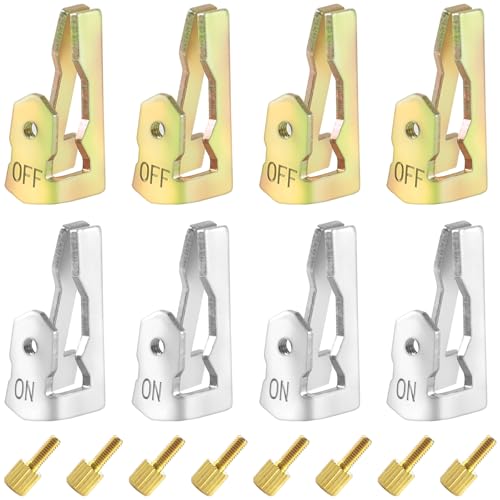
【Super Value Pack】Each package includes 8 time switch replacement trippers kit—4 gold trippers and 4 silver trippers—along with 8 fixing screws.Timer trippers replacement switch kits are designed to meet your diverse needs for replacements and adjustments.The compact size of each timer tripper,measuring 1.02x0.39x0.43 inches,ensures easy storage and handling

time timer parts: These pool timer on off clips are made of upgraded materials that are not prone to corrosion and rust. Compared to replacing the entire timer, using a replacement release can save storage, maintenance, and repair time.

[Replace Missing or Broken Timer Tripper]: Dreyoo pool timer on off clips are exclusively designed for compatible with 156T1978A timers; These pool timer replacements are made of upgraded materials that are not prone to corrosion and rust
Essential Tools
- Screwdriver: Use a flathead and Phillips screwdriver for straightforward installation.
- Wire Strippers: These help in stripping wire insulation without damaging the wire.
- Pliers: Needle-nose pliers work well for gripping and bending wire.
- Drill: A power drill or cordless drill is handy for mounting the timer to a surface.
- Timer: Choose a timer compatible with your pool pump type, such as mechanical, digital, or smart timers.
- Wire Nuts: These fasteners secure wire connections safely.
- Electrical Tape: Use this for additional insulation on wire connections.
- Mounting Hardware: Ensure you have screws and anchors if mounting on a concrete or brick wall.
With these tools and materials ready, you’re set for the installation process. This preparation saves time and minimizes errors, ensuring your pool pump timer works efficiently.
Step-by-Step Installation Process
Installing a timer on your pool pump can streamline maintenance and enhance convenience. Follow this organized guide for a successful setup.
Recommended Products

✓ VERSATILE & CUSTOMIZABLE: Easily set up to 8 on/off programs for the timer’s two grounded outlets. Outlets are controlled simultaneously, and settings can be as short as one minute.

【Daily Repeat Mechanical Timer】: 48 ON/OFF setting options in 24 hours; each pins means 30 minutes interval; daily repeat your setting.

VERSATILE & CUSTOMIZABLE: Easily set up to 8 on/off programs for the timer's two grounded outlets. Outlets are controlled simultaneously, and settings can be as short as one minute
Disconnecting Power
- Turn off the circuit breaker that supplies power to the pool pump. This prevents electrical shock during installation.
- Verify that the power is off by checking that the pump isn’t running. Use a voltage tester for added safety, ensuring no electricity is present.
Mounting the Timer
- Select a location for the timer within reach of the pump and a power source. Choose a weatherproof spot for outdoor installation.
- Use a pencil to mark the positions for mounting screws based on the timer’s provided template.
- Drill holes into the marked locations and insert anchors if necessary. Secure the timer to the wall using the screws and a screwdriver.
Wiring the Timer
- Remove the timer cover to access the wiring terminals. Confirm the timer’s wiring diagram for clarity.
- Connect the pool pump wires to the timer. Typically, this involves connecting the power supply wire to the “Line” terminal and the pump wire to the “Load” terminal.
- Ensure all wire connections are tight. Use wire nuts to cap exposed wires, and wrap electrical tape around them to secure connections.
- Refer to the timer’s user manual for specific settings. Generally, you’ll set the current time and desired on/off cycles.
- Choose the days you want the pump to operate, adjusting for seasonal needs.
- After programming, replace the timer cover and restore power by turning the circuit breaker back on.
Using these steps, you’ll successfully install a timer on your pool pump, allowing for effective and automated maintenance.
Troubleshooting Common Issues
Addressing issues with your pool pump timer can enhance your maintenance routine. Here are some common problems and solutions.
Recommended Products

POWERFUL POOL FILTRATION: Are you still worried about cleaning your pool? KimFilter 1000GPH Filter Pump will be a great choice. It is powerful and can handle up to 1,000 gallons of water per hour and manage pools with a capacity of up to 6,500 gallons. Whether you're filtering or keeping the water circulating, it will do the job with ease, ensuring that you can enjoy a clear and clean pool without worrying about water quality.

𝐄𝐅𝐅𝐈𝐂𝐈𝐄𝐍𝐓 𝐀𝐍𝐃 𝐄𝐍𝐄𝐑𝐆𝐘-𝐒𝐀𝐕𝐈𝐍𝐆: The VIVOHOME 12-in sand filter pump boasts a 28.7 lb sand capacity, delivering a maximum flow rate of 2087 GPH and a maximum head height of 25 ft; Designed to efficiently reduce energy consumption, this pump ensures optimal performance by precisely matching the right power for most above-ground pools; It’s also perfect for in-ground pools ranging from 7596 Gal (running 6 hours) to 10128 (running 8 hours) Gal

【Powerful Circulation for Medium & Large Pools】This variable speed pool pump delivers strong, consistent water flow for residential in-ground and above-ground pools. Designed for medium to large pool systems, it helps improve filtration efficiency and maintain cleaner pool water.
Timer Not Working
If the timer doesn’t operate, check the following:
- Power Supply: Ensure the power source is working. Test other devices in the same outlet.
- Connections: Inspect all electrical connections. Loose or corroded wires prevent proper function.
- Fuse: Look for a blown fuse in the timer. Replace it if necessary.
- Timer Reset: Try resetting the timer. This often resolves minor glitches.
Incorrect Timer Settings
Incorrect settings can lead to inefficient pump operation. Verify these key areas:
- Schedule Setup: Confirm you’ve programmed the correct start and stop times. This ensures proper circulation.
- Mode Selection: Check if the timer is set to automatic mode. Manual settings may disrupt operation.
- Duration Settings: Review how long the pump runs daily. Ensure it’s adequate for your pool’s size and filtration needs.
By monitoring these issues, you can maintain optimal timer performance for your pool pump.
Conclusion
Installing a timer on your pool pump can make a world of difference in your pool maintenance routine. With the right tools and a little know-how you can enjoy hassle-free operation and energy savings. Remember to keep an eye on your timer settings and troubleshoot any issues that come up.
By taking these simple steps you’ll ensure your pool stays clean and inviting all season long. So go ahead and dive into your new project—you’ll be glad you did!
Frequently Asked Questions
What are the benefits of using pool pump timers?
Using pool pump timers can greatly streamline maintenance routines by automating pump operation. This ensures consistent water circulation, saving time and energy while reducing costs. Timers help prevent algae growth and maintain clear water, contributing to overall pool health.
What types of pool pump timers are available?
There are three main types of pool pump timers: mechanical, digital, and smart timers. Mechanical timers are simple and cost-effective, digital timers offer programmable features, and smart timers provide remote access and customizable settings via apps for enhanced convenience.
How do I install a pool pump timer?
To install a pool pump timer, gather necessary tools like a screwdriver, wire stripper, and electrical tape. Follow the manufacturer’s instructions for wiring the timer to the pump and power supply. Make sure to turn off the electricity before beginning the installation for safety.
What tools do I need to install a pool pump timer?
To install a pool pump timer, you’ll typically need a screwdriver, wire stripper, electrical tape, and possibly a multimeter to check connections. Ensuring you have the right tools will make the installation process smoother and more efficient.
How can I troubleshoot common pool pump timer issues?
To troubleshoot timer issues, check the power supply to ensure electricity is reaching the timer. Inspect connections for any loose or damaged wires, replace any blown fuses, and verify that the timer settings haven’t been accidentally changed. Consult the timer’s manual for specific troubleshooting steps.
What if my pool pump timer is not working properly?
If your pool pump timer isn’t functioning correctly, start by checking the power supply and connections. Ensure that the timer settings are correct and inspect for blown fuses. If issues persist, it may be necessary to reset or replace the timer following the manufacturer’s guidelines.